Proofread anything you type, in any app.
Select some text, press your shortcut, and TextTidy fixes spelling, grammar and punctuation, then puts it straight back where you were writing.
7-day free trial, then £1.99 a month. Cancel any time.

- Outlook
- Word
- Teams
- Slack
- Gmail
- Google Docs
- Notes
- Messages
- and more
Three steps. No copying and pasting.
TextTidy lives in your menu bar or system tray, a shortcut away, with no browser extension and no website to paste into.
Select your text
Highlight a sentence, a paragraph or a whole email, in whatever app you're writing in.
Press your shortcut
Pick any key combination you like in Settings. A small popup opens beside your text, with the fixes usually there in a second or two.
Check it, then Apply
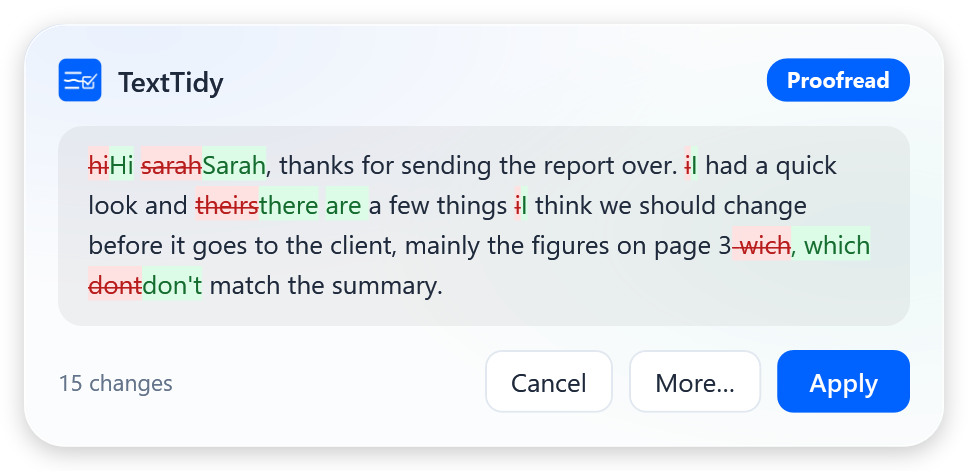
Every change is highlighted. Press Return to Apply and the corrected text replaces yours, right where it was. Changed your mind? Just undo.
See it in action
The same TextTidy on Mac and Windows, in light and dark mode.
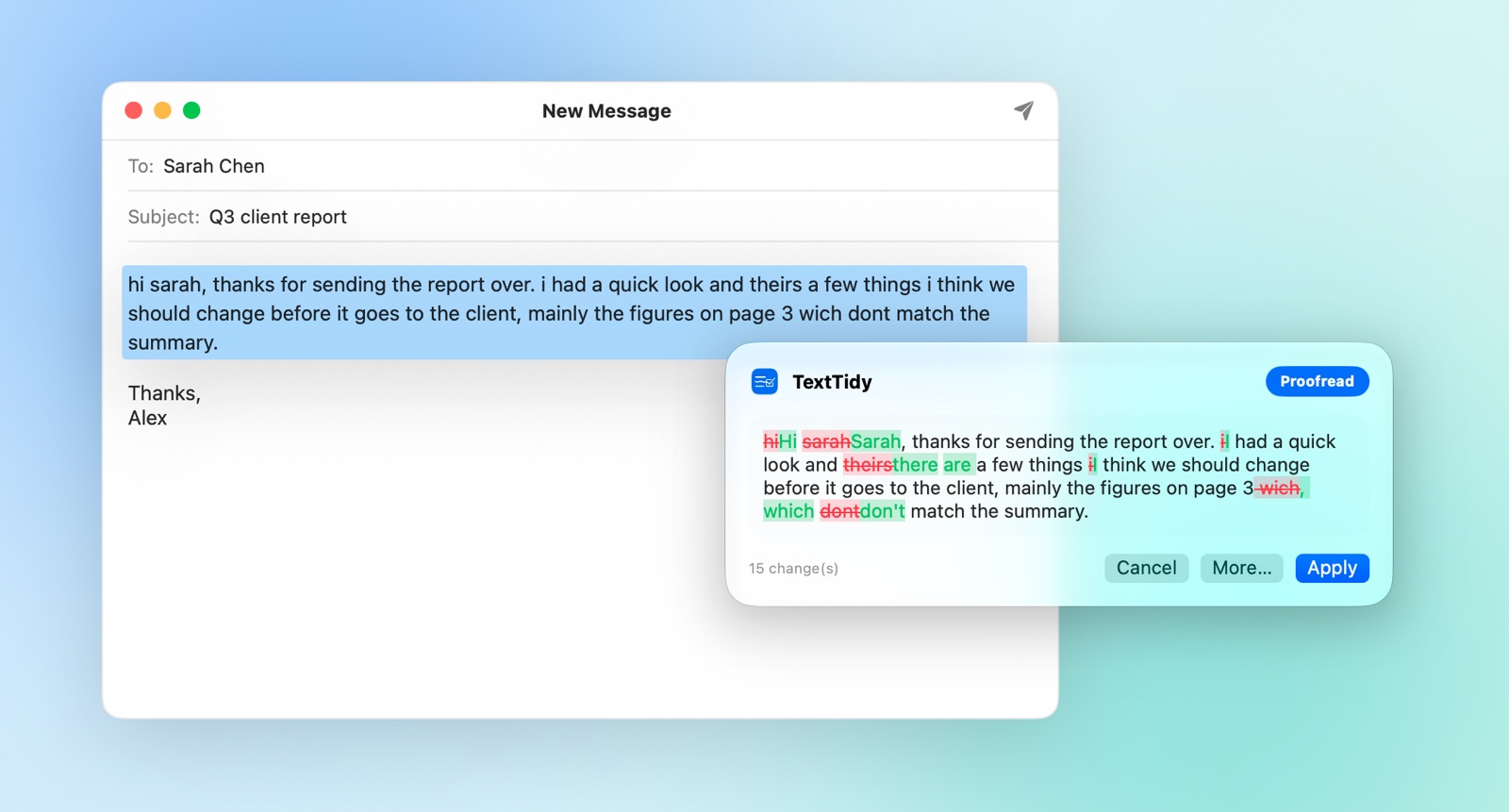
hi sarah, thanks for sending the report over. i had a quick look and theirs a few things i think we should change before it goes to the client, mainly the figures on page 3 wich dont match the summary.
Thanks,
Alex
 12:41
12:41Want more than a proofread?
Use your second shortcut, or choose More… in the popup, to open the full window. Then:
- Switch tone: formal, business casual, friendly, concise and more.
- Add an instruction such as “British spelling” or “make it shorter”, then press Return.
- Explain changes gives a short, plain-English note on each fix, so you learn as you go.
- Save your own commands, like “turn this into a polite reminder”.

Everything at a glance
Settings shows your plan, today's and this month's usage, a 30-day chart and the devices signed in to your account. You can also:
- Use one subscription on two devices, say your Mac at home and your PC at work.
- Sign in with a code sent to your email. There's no password to remember.
- Download your data in one click, from the app or your account page.
- Pick your default tone, and set both shortcuts to whatever suits your keyboard.

Built for the way you already write
Small enough to forget about, until you need it.
Works everywhere
Email, chat, documents, browsers: anywhere you can select text, including web apps and desktop apps.
See every change
Deletions are struck through in red and additions shown in green, before anything is replaced.
One press to apply
Apply pastes the fix back in place. It's a single undo step in your app, so ⌘Z or Ctrl Z brings your original back.
Tones and commands
Proofread, formal, friendly, concise, translate, or write your own commands and keep them.
Learn as you go
Ask TextTidy to explain its changes and get a quick note on each one, like a writing coach.
Your shortcuts
Choose the key combinations that suit you, one for the instant popup and one for the full window, and change them any time.
Light and dark
Follows your system's appearance on Mac and Windows, so it always looks at home.
Two devices
One subscription covers two devices, Mac or Windows, sharing one allowance.
Private by design
TextTidy only sends text when you press the shortcut, and it never keeps what you wrote.
Your words stay yours
TextTidy is built so that there's nothing of yours to lose.
- Text is sent only when you press the shortcut, and only the text you selected.
- It's proofread and sent straight back. We don't store it and we don't log it.
- We keep only usage counts (how many requests, how much text), so we can apply fair use.
- Download everything we hold about you, any time, from the app or your account.
One simple plan
Try it free, then keep it for less than a coffee a month.
- Unlimited everyday proofreading (fair use)
- All tones and your own custom commands
- 2 devices, Mac or Windows
- Cancel any time
Questions
The things people ask before they try it.
Which apps does it work with?
Almost anything you can type into: Mail, Outlook, Word, Teams, Slack, WhatsApp, Notes and web apps such as Gmail and Google Docs. If you can select the text, TextTidy can proofread it.
What do I need?
A Mac running macOS 14 (Sonoma) or later, or a PC running Windows 10 or 11, and an internet connection. On a Mac, TextTidy asks for Accessibility permission, which it needs to read your selection and paste the result back.
What happens after the free trial?
Your subscription starts at £1.99 a month unless you cancel before the trial ends. If you subscribed on this website, you can cancel in a couple of clicks from your account page. If you subscribed through the Mac App Store, Apple manages the subscription: cancel it in the App Store under your account's Subscriptions, or in System Settings under your name, then Media & Purchases. Either way, you keep TextTidy until the end of the period you've paid for.
Can I use it on my Mac and my PC?
Yes. One subscription covers 2 devices, and they share one allowance. You can sign a device out from Settings or your account page to make room for a new one.
Does TextTidy keep my text?
No. Your text is proofread and sent straight back, and it isn't stored. We keep only counts of how much you've used, and you can download those at any time.
Will it change what I mean?
The default Proofread tone fixes spelling, grammar and punctuation and leaves your wording alone. You see every change before it's applied, and TextTidy warns you if a result looks too different from what you wrote.
What does “fair use” mean?
Enough for heavy everyday writing: hundreds of proofreads a day. The limits only stop automated or abusive use, and your usage is always shown in Settings.
Does it work in other languages?
Yes. TextTidy proofreads in the language you write in, and the Translate tone rewrites your text in another language. Add the language you want in the instructions box.
Write with confidence, everywhere
Try TextTidy free for 7 days. No commitment: cancel any time.
Start your free trial